Building the Master Console

Streamlining Operational Control by

80% Faster Resolution Time and Eliminating Engineering Dependency for base tasks

Intelligent Friction. Empowering Ownership.

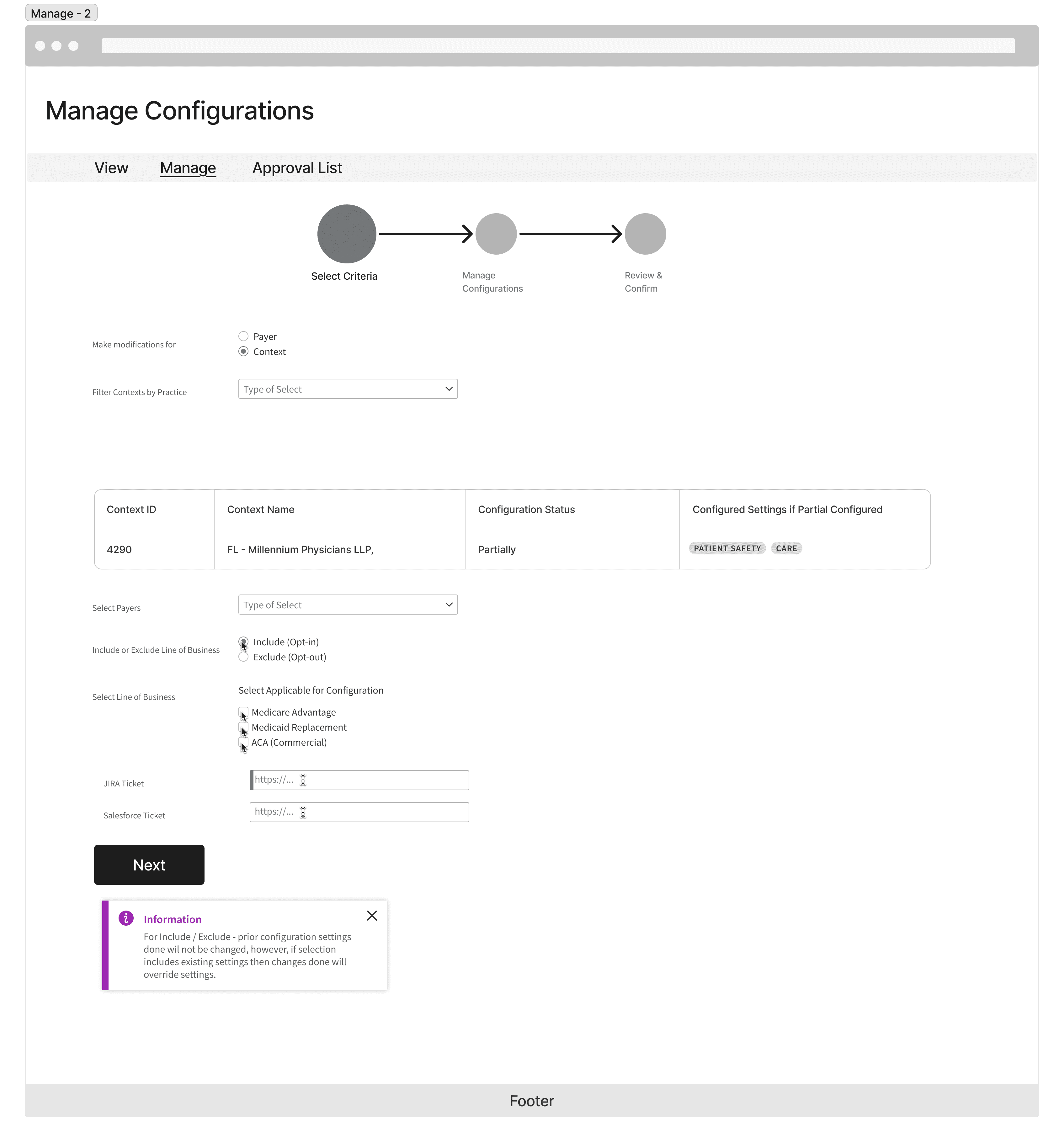
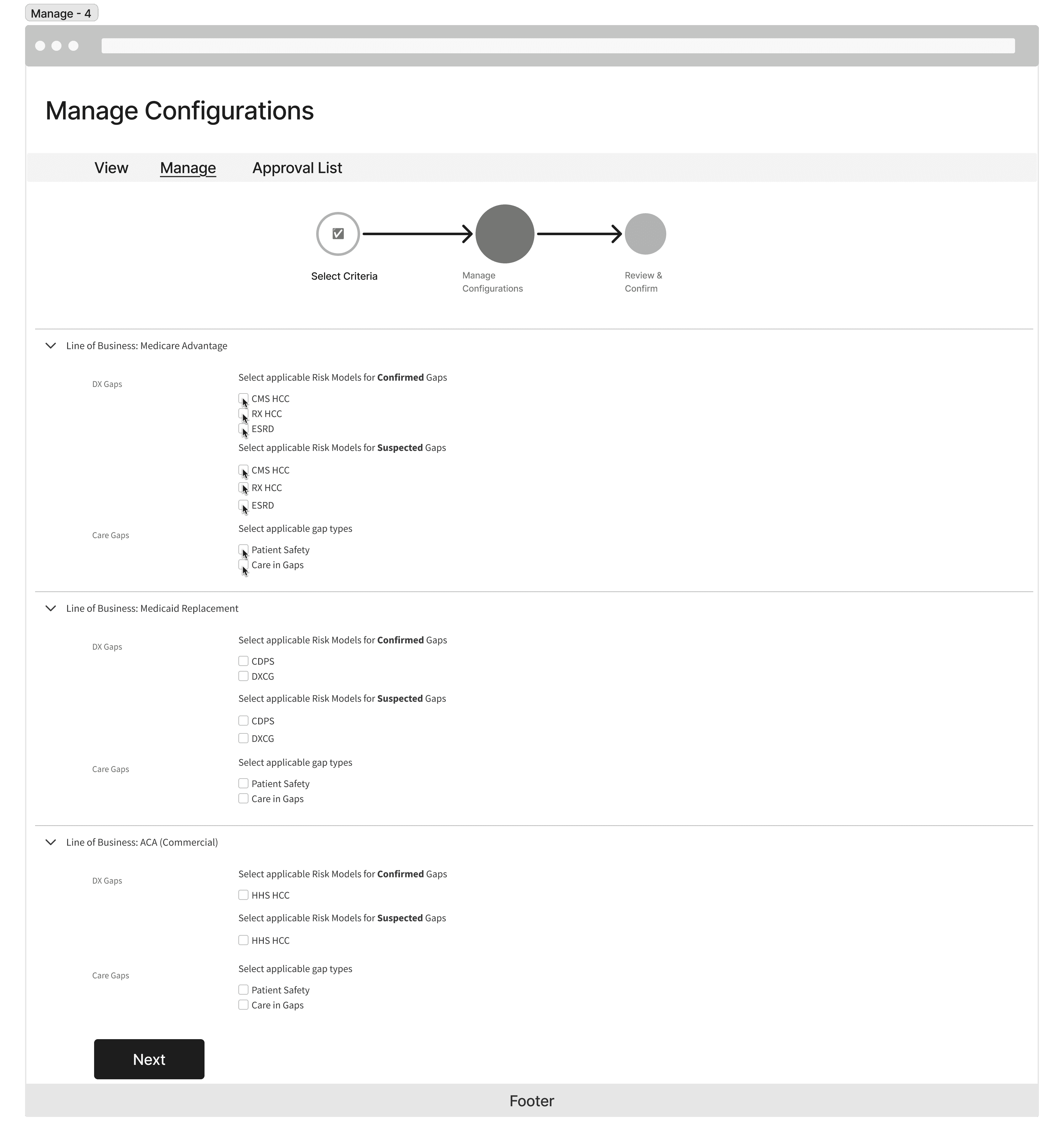
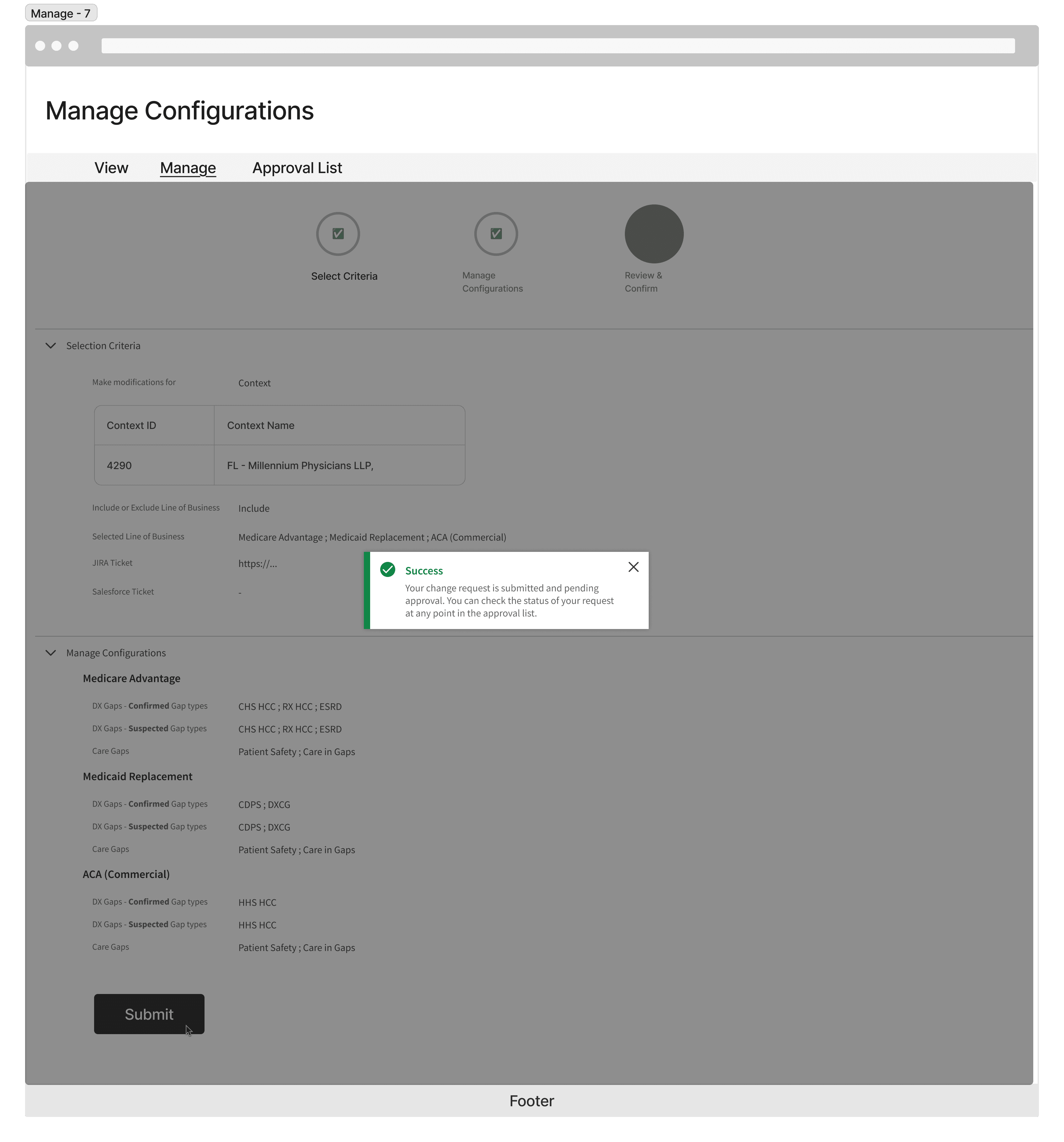
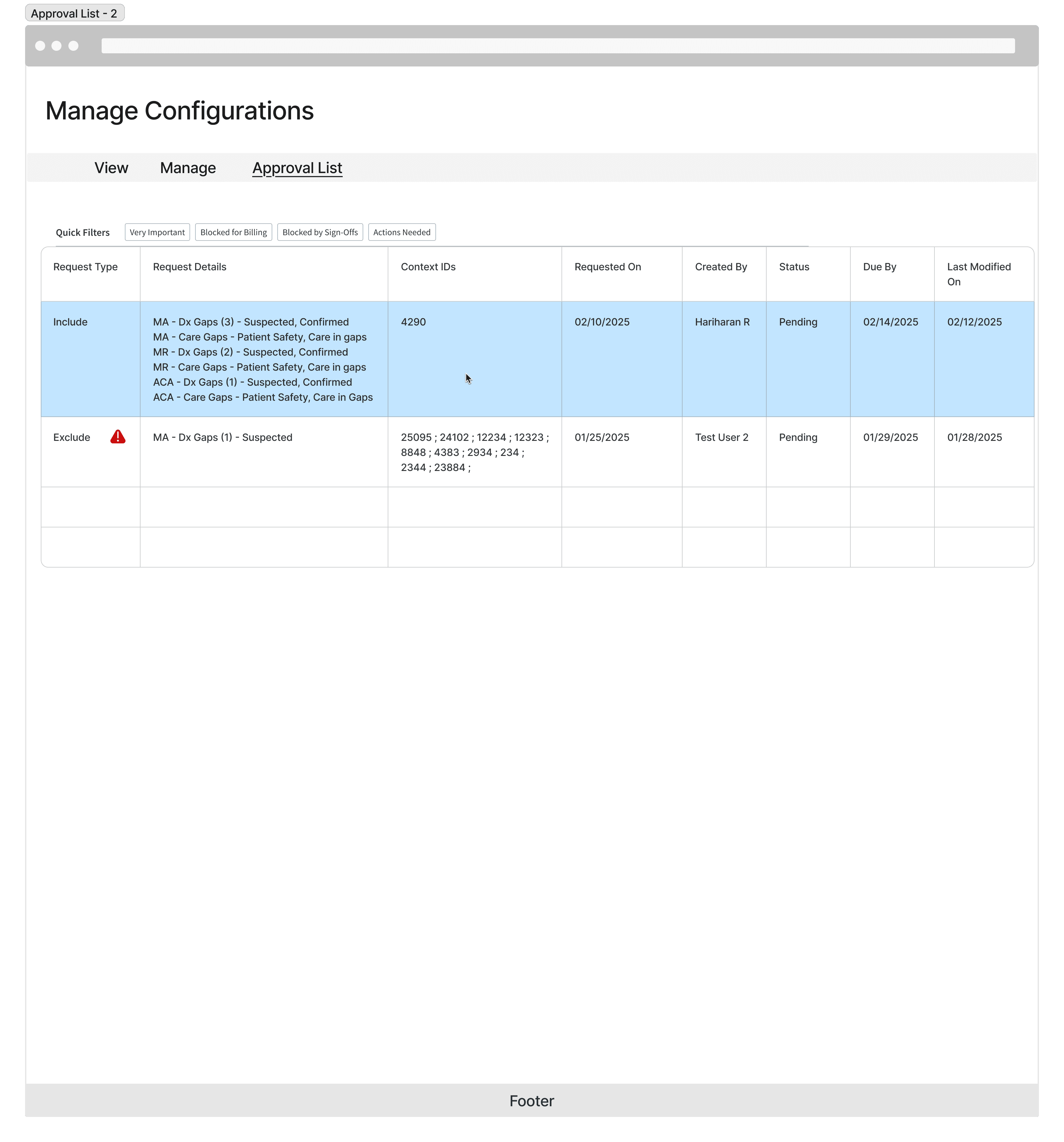
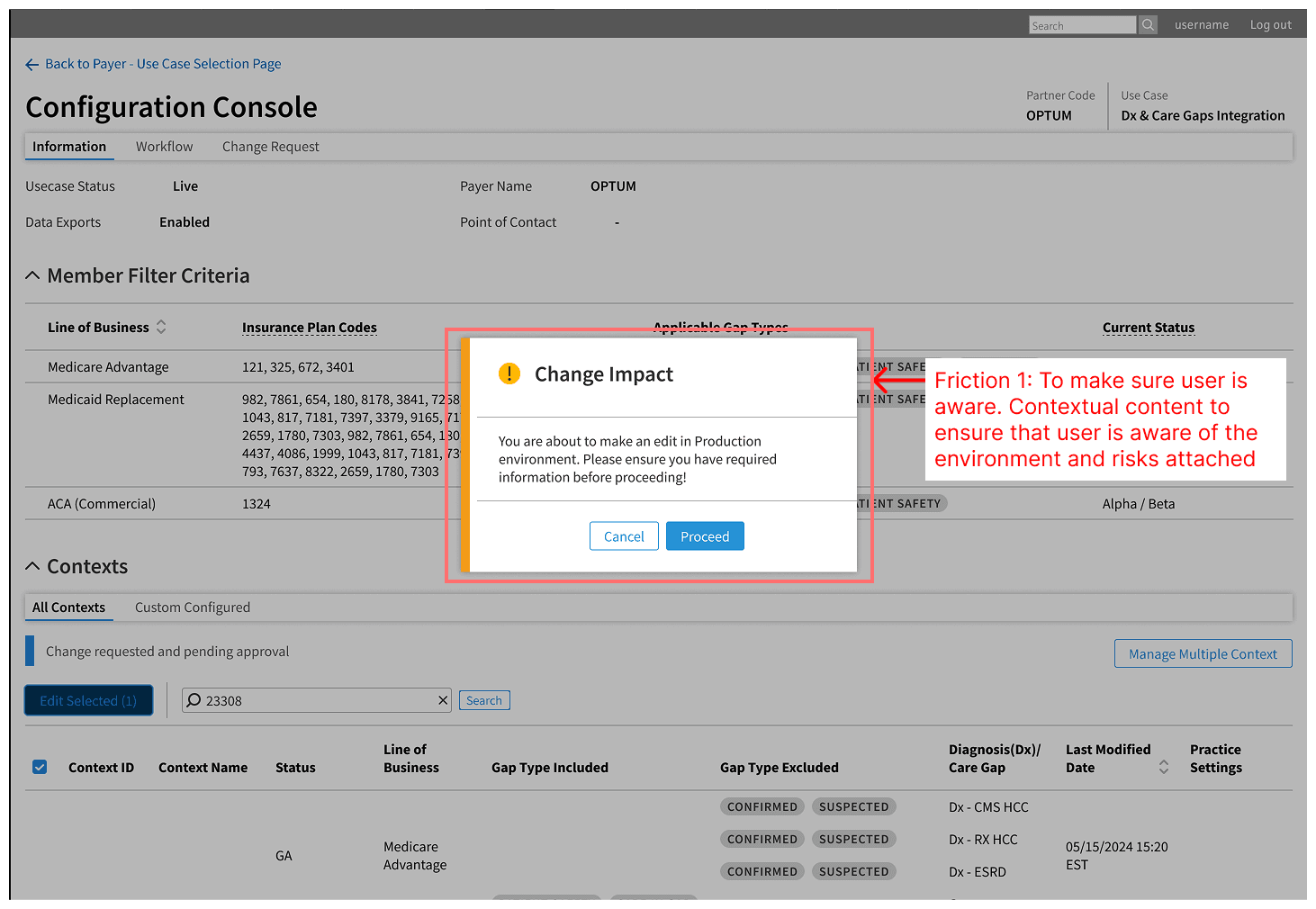
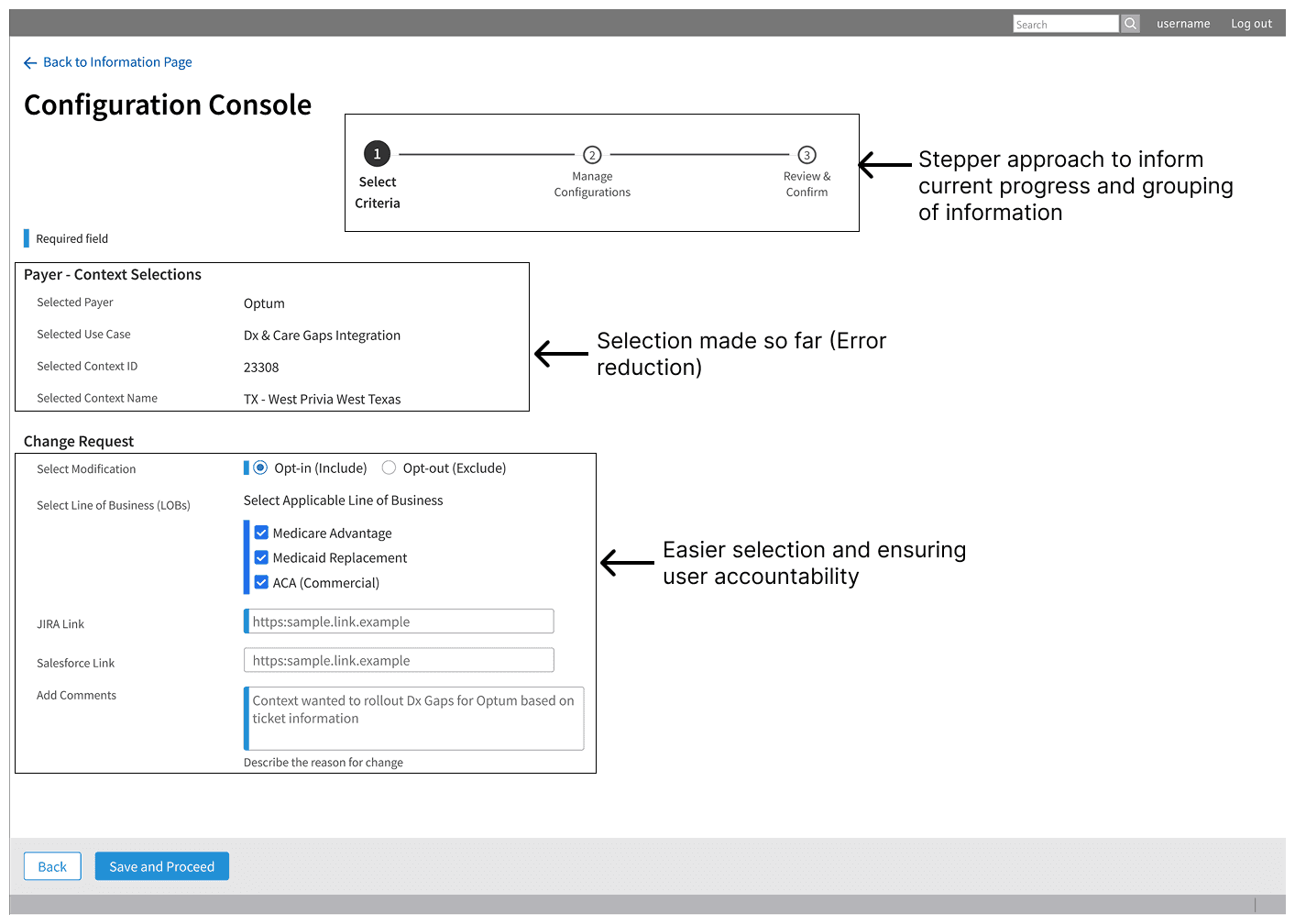
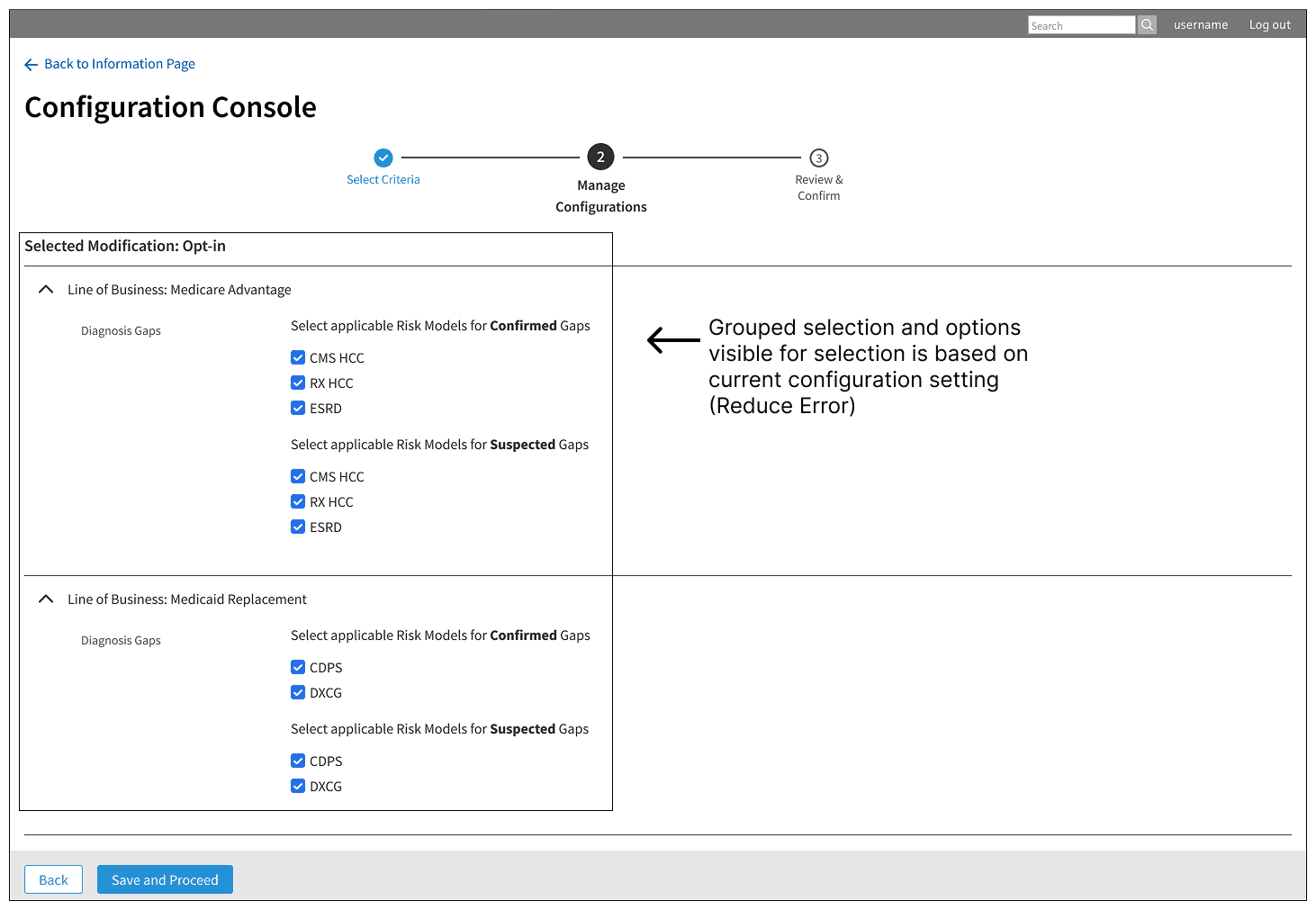
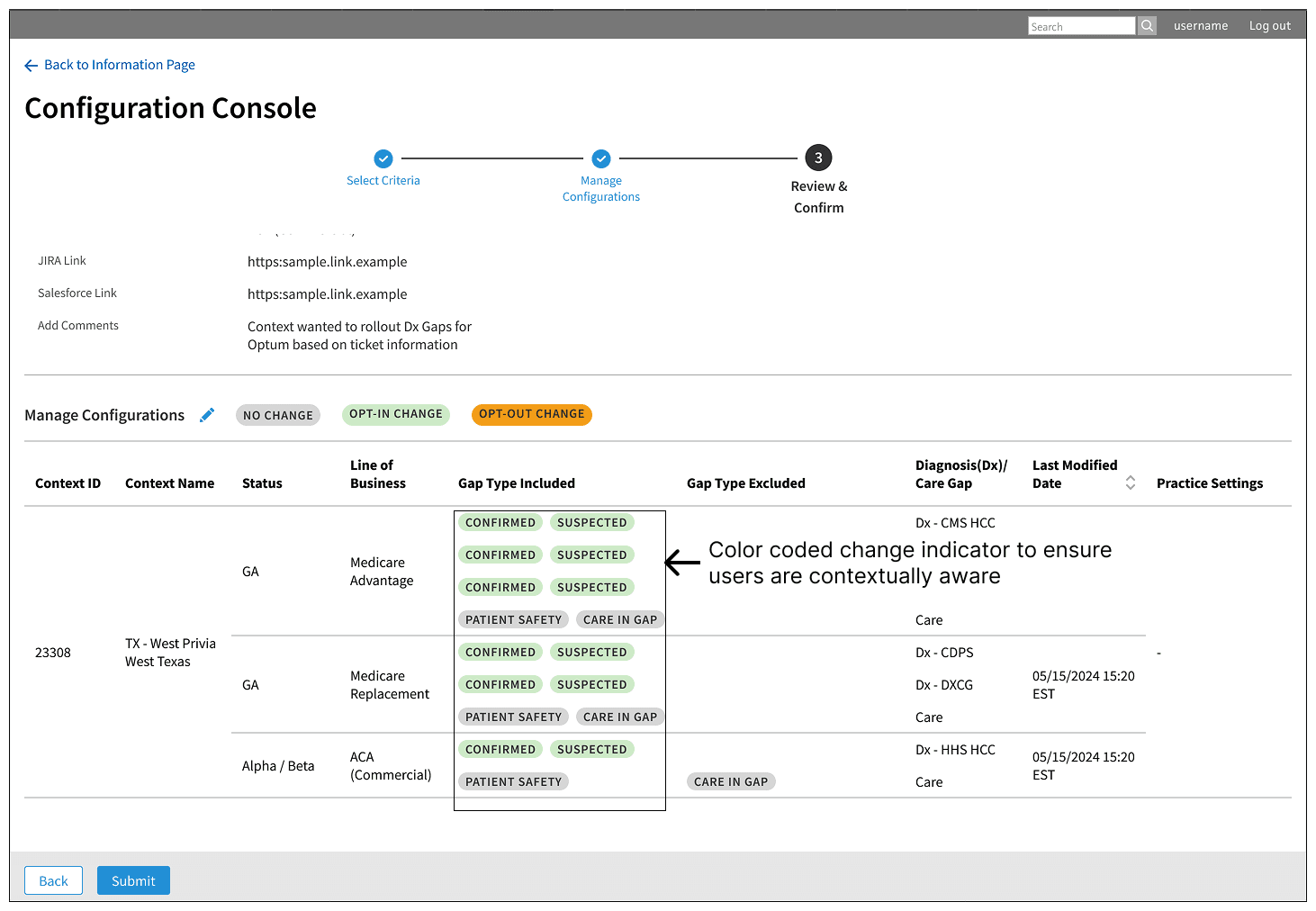
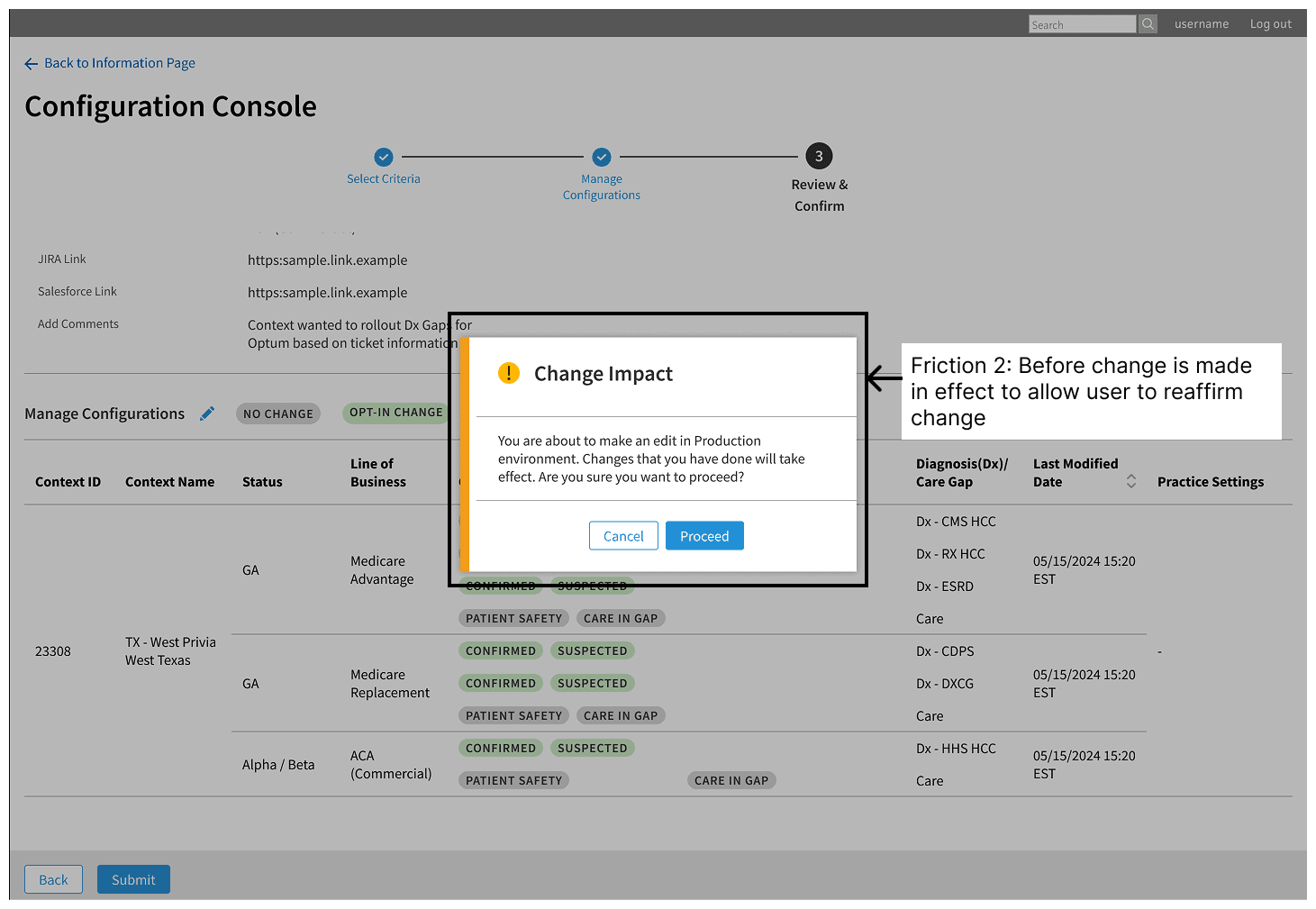
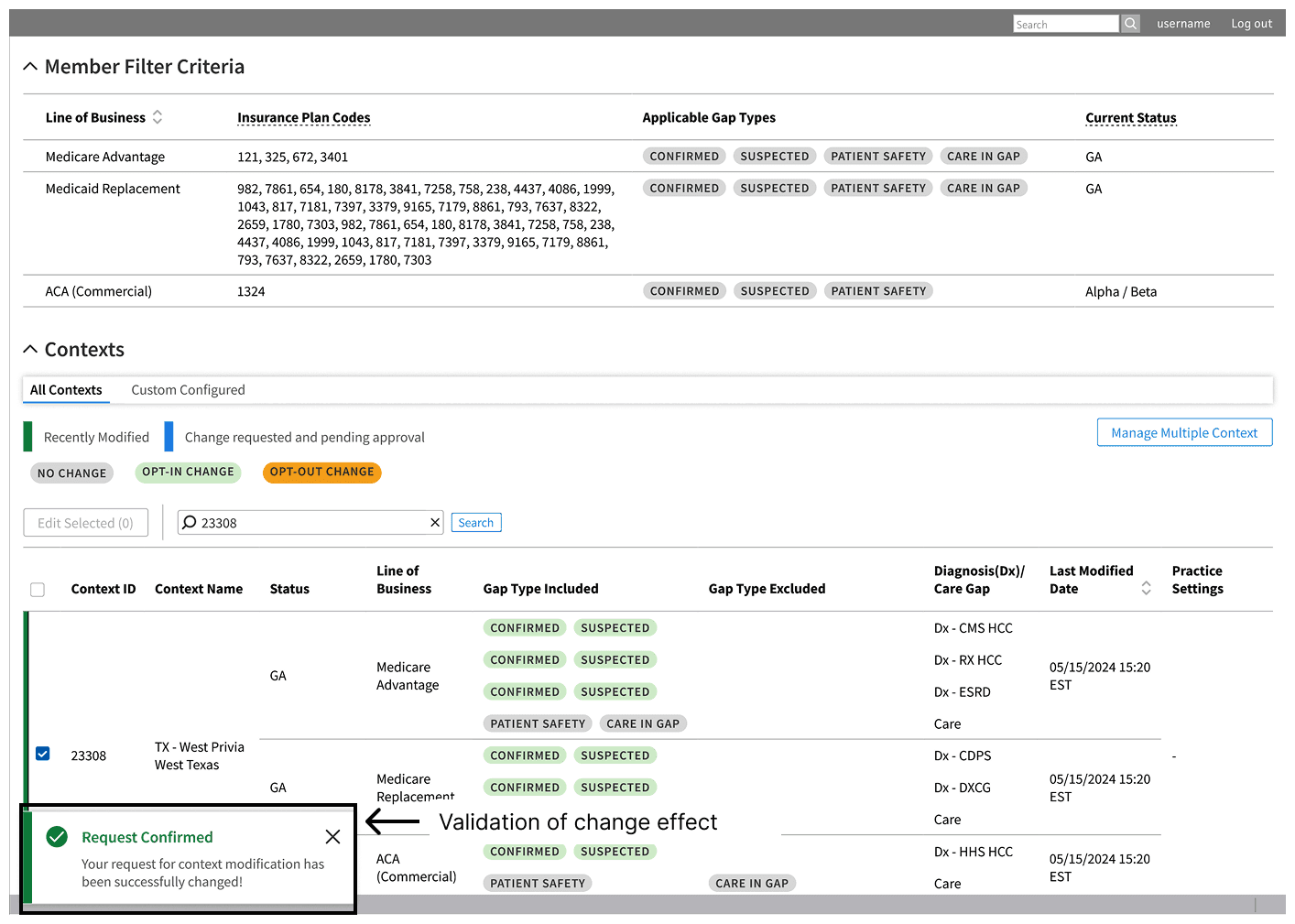
We delivered a robust console that required minimal guidance, allowing support teams to execute high-stakes configurations with confidence. By introducing strategic friction - deliberate pauses and clear warnings - we aligned with the user's mental model, ensuring safety without sacrificing speed. The result is a system that feels effortless, eliminating the fear of error while permanently lifting the engineering burden.

video zoom

video zoom

video zoom

Images Movement

Images Movement

Images Movement

// 01. Introduction & Problem hypothesis

Operational Burden: The Code Trap

In healthcare gap data exchange service, connecting a Payer (Insurance) to a Provider (Doctor) is not plug-and-play. It requires configuring hundereds of specific rules: which "Gaps" are aligned to which "Plan"; which plan is aligned to which "Line of Business"; which of these are active; which practices (hospitals / clinics) receive these gaps; and to ensure proper interfacing the technical API endpoints.

THE ORIGIN

The engineering team had already built a raw utility to manage configuration settings. They approached Design with a simple request: "Can you review this and make it better?"

They assumed the bottleneck was just a clunky UI. They wanted a "skin" so they could hand it off to Operational Teams (Customer Support & Partner Teams) and stop drowning in manual configuration tickets.

THE PUSHBACK

I argued that unless we understood the behavioral readiness of the Operational Teams, the tool would fail. A better UI will not solve the problem if the user is unwilling to adopt.

If the workflow did not match, they would not use the tool - they would just delegate the task back to Engineering via a ticket, leaving us exactly in the current situation.

STRATEGIC AUDIT

Before expanding the utility, I needed to stress-test the foundation against three critical dimensions:

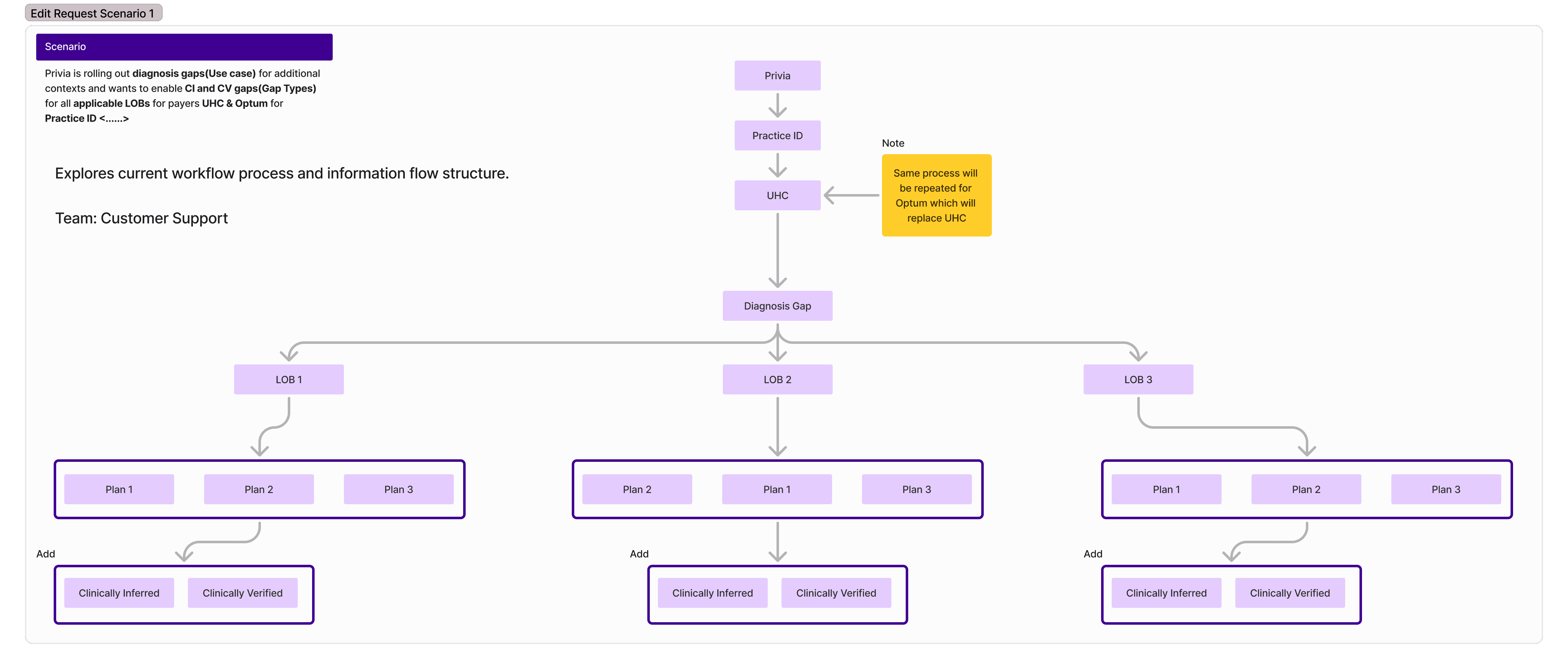
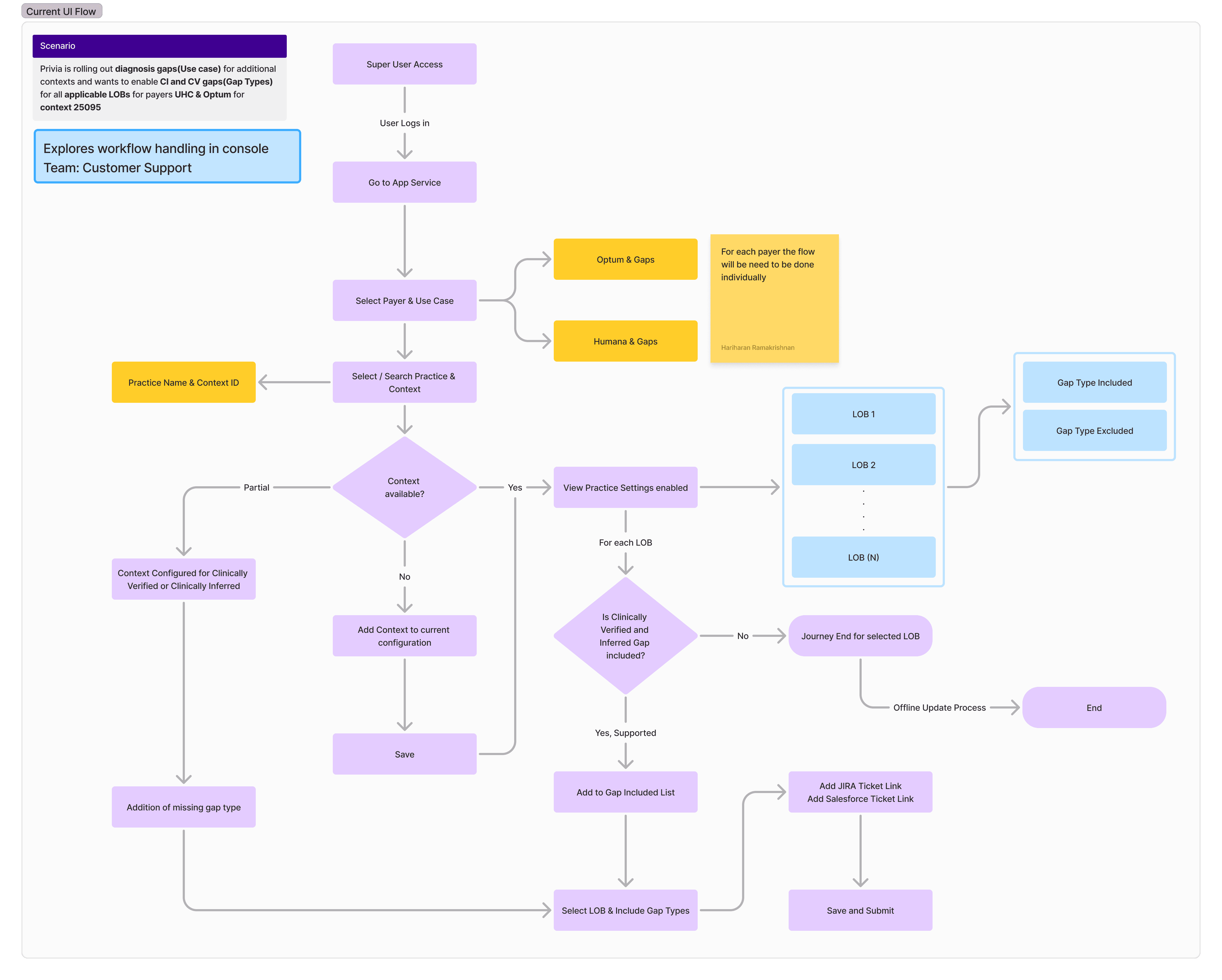
Workflow: How does a request actually flow before it hits the engineering backlog?

Capability: Does the support team possess the context to make high-stakes changes safely?

Governance: Who audits these changes to prevent contract breaches?

Back to Formula: These unknowns posed a fundamental risk: Was the existing tool scalable or would I need to dismantle the entire system

// 02. Discovery

Research: Investigating the Ecosystem

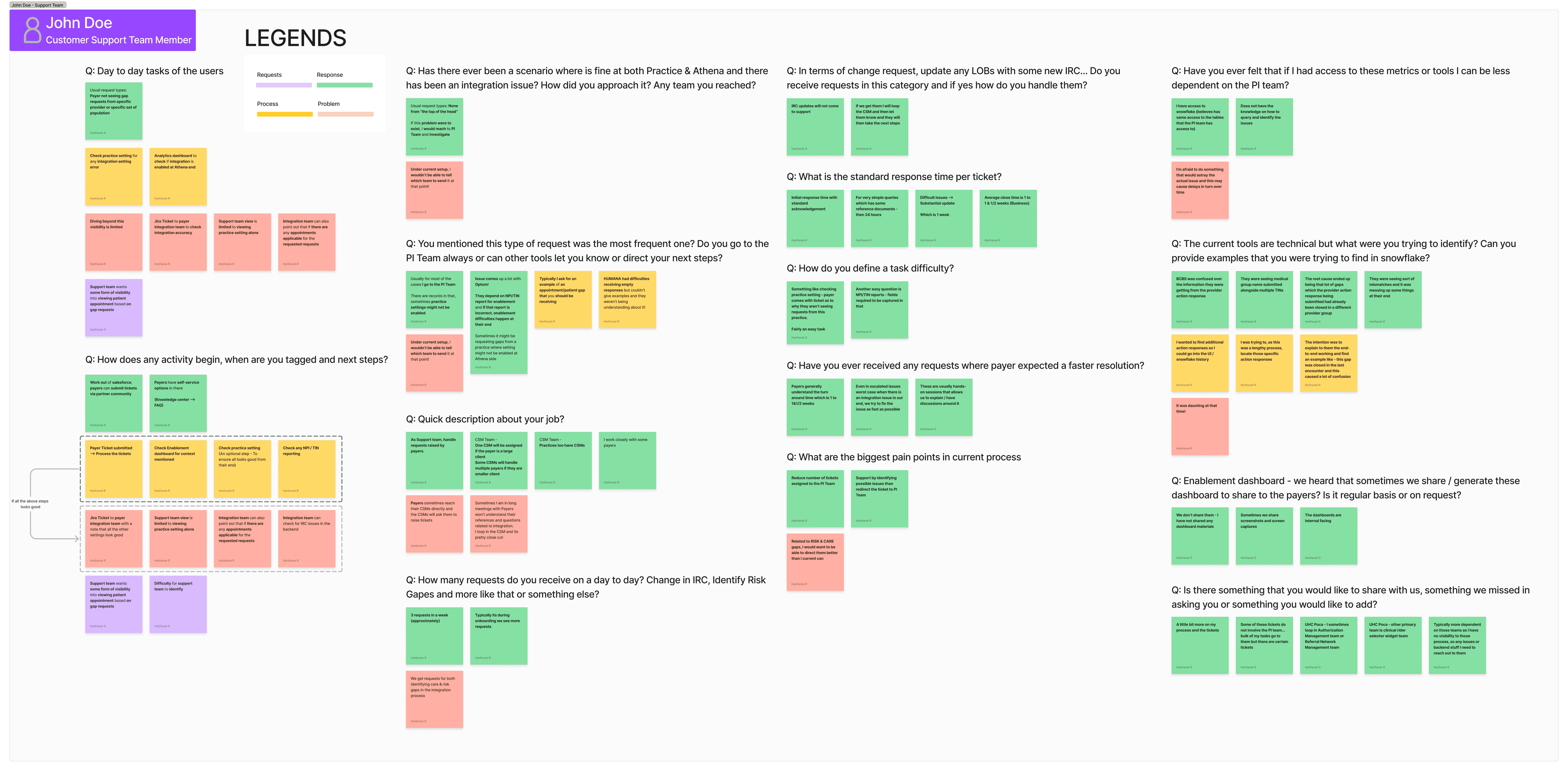
I conducted deep-dive interviews with our Internal Operational Teams (Customer Success, Partner and Customer Support) to map the end-to-end workflow. Each team owned a distinct slice of the process and naturally advocated for their own tasks as the highest priority. The challenge was not just identifying pain points, but finding the objective to arbitrate between these competing internal needs.

Rapid Tool Audit: Baselining the existing engineering utility to understand its raw capabilities and technical constraints

Lifecycle Mapping: Tracing the full journey of Diagnosis & Care Gaps from

Payer Contract

Configuration

Provider Enablement

Task Analysis: Identifying every human touchpoint and distinguishing between routine operations and high-risk changes

Adoption Readiness: Probing the behavioral risk. Would users accept the new responsibility or delegate it back?

To de-risk the engineering handover and validate the "self-serve" hypothesis, I initiated a comprehensive operational audit. This research phase focused on deconstructing the end-to-end configuration lifecycle, engaging directly with stakeholders across the value chain to assess organizational readiness for tool adoption.

Strategic Inquiry Framework

Process, Tasks & Current Flow

When a Payer / Provider asks for a configuration change, walk me through the exact steps you do today?

How many requests do you get that are deemed a contract change, walk me through the steps you do today?

Frequency, Validation & Velocity

How many requests do you get as an average in a month?

What are frequent tickets that you get and your thoughts on why this is happening?

How do you currently validate that a change has been applied in production?

Unforseen Issues

What are the other types of issues that you have received requests for? Such as data exchange service issue?

What is the standard response time per ticket?

What are the current challenges you face in resolving tickets or tasks today?
THE BLACK BOX

90% of requests converted to Engineering tasks because configurations were locked in code with zero audit trail.

// 03. Synthesis

Mapping the Synthesis to Workflows

// Identifying the Operations

Operational Bottlenecks

Fragmented Configuration

Without clear configuration answers, support team search multiple places and still send nearly 90% of requests to engineering.

Blind Ticket Tracking

"I raised a request 3 days ago. What is the status?" - Zero visibility for support agents or payers.

Engineering Bottleneck

Simple configuration lookups required a JIRA ticket, blocking Engineering from core feature work.

Image of research data synthesis post interview

Operational Tasks and Workflows

Payer Onboarding

Configuration Amendment

Data Discrepancy / Error

  1. Administrative Logistics & Burden

Partner Team

Sign Contract & Creates Project

Salesforce entry and artifact collection

Partner Team

Create Sharepoint

Stores client artifacts, elaborates on business case and expands project plan

  1. Implementation (Bottleneck)

Engineering Team

Establish Connectivity

Connect with payer technical team

!

Engineering Team

API Configuration

Works on API settings per regulatory standards and provides input for payer technical team

!

Engineering Team

Gap Logic Setup

Works on setting up the configuration settings for payer

!
  1. Validation & Close

Engineering Team

Validation

Tests endpoints of payers and organizations

!

Partner and Customer Success

UAT & Sign off

Saves confirmation sign-offs from payer in SharePoint

  1. Administrative Logistics & Burden

Partner Team

Sign Contract & Creates Project

Salesforce entry and artifact collection

Partner Team

Create Sharepoint

Stores client artifacts, elaborates on business case and expands project plan

  1. Implementation (Bottleneck)

Engineering Team

Establish Connectivity

Connect with payer technical team

!

Engineering Team

API Configuration

Works on API settings per regulatory standards and provides input for payer technical team

!

Engineering Team

Gap Logic Setup

Works on setting up the configuration settings for payer

!
  1. Validation & Close

Engineering Team

Validation

Tests endpoints of payers and organizations

!

Partner and Customer Success

UAT & Sign off

Saves confirmation sign-offs from payer in SharePoint

Payer Onboarding

Payer Onboarding

Configuration Amendment

Data Discrepancy / Error

  1. Administrative Logistics & Burden

Partner Team

Sign Contract & Creates Project

Salesforce entry and artifact collection

Partner Team

Create Sharepoint

Stores client artifacts, elaborates on business case and expands project plan

  1. Implementation (Bottleneck)

Engineering Team

Establish Connectivity

Connect with payer technical team

!

Engineering Team

API Configuration

Works on API settings per regulatory standards and provides input for payer technical team

!

Engineering Team

Gap Logic Setup

Works on setting up the configuration settings for payer

!
  1. Validation & Close

Engineering Team

Validation

Tests endpoints of payers and organizations

!

Partner and Customer Success

UAT & Sign off

Saves confirmation sign-offs from payer in SharePoint

// Persona

Customer Support Team

"We own all support tickets resolution solutions for all payer solutions. Payers will raise a ticket in success community page and based on the request type, we will classify it. Request will be self-assigned based on task load and resolution times vary from 1 to 1.5 business weeks based on engineering involvement."

SELF SERVICE GOAL

Provide timely resolution (reduced resolution for basic configuration tasks from 1 to 1.5 business weeks to less than 24 hours)

Ability to monitor tool to view subscriptions and data sharing status

OPERATIONAL FRICTION

Average close time is 1 to 1.5 business weeks for most requests and longer if engineering team is involved

Zero visibility: constant need to redirect tickets to engineering team to investigate backend issue

Inability to investigate issues (like configuration setting errors) at the payer end without escalation

// Leadership review to an Informed Decision

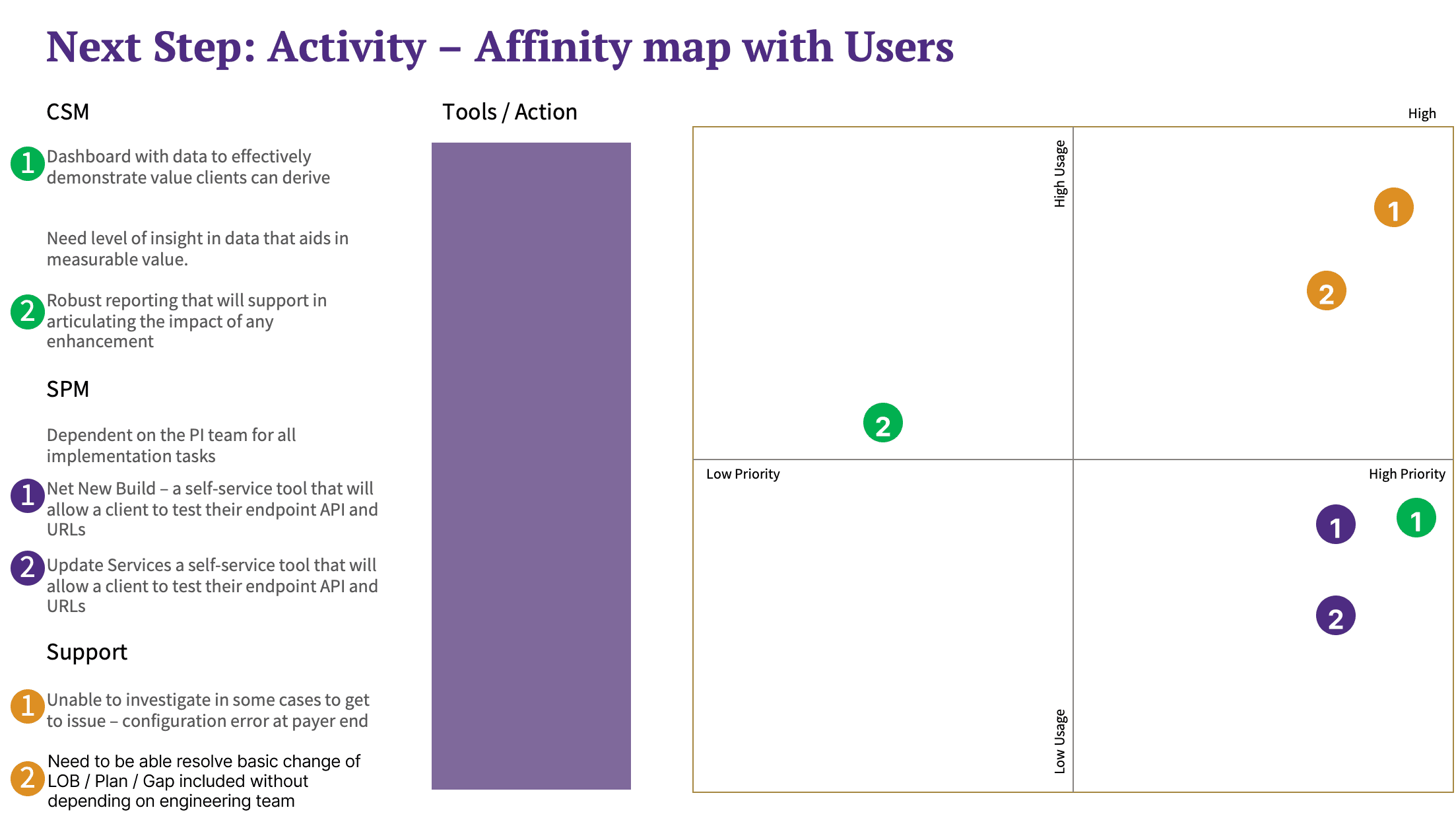
Affinity Mapping

Complied list of jobs owned by different teams and mapped their usage to priority. This allowed leadership team to view tasks, the type of request and understand which teams will actually consume the tool if provided.

The verdict: An informed MVP plan.

MVP Pivot

The research synthesis to leadership exposed critical reality: Approximately 80-85% of payers were already enrolled in the service.

While the door remained open for the few pending payers, the operational velocity for new integrations was capped at 3 per year. In stark contrast, the "Day 2" maintenance for the massive installed base generated a relentless stream of high-friction tickets.

The existential risk was not slow growth, but churn within the existing partner ecosystem due to service friction. This insight reshaped our direction: we deprioritized the Onboarding effort to anchor the MVP entirely on Operational Maintenance.

// 04. Strategy

Define the Guardrails and Reconstruct

// The Risk

The User Challenge

Users wanted a tool that would be flexible enough to empower teams ready for autonomy, while maintaining robust guardrails in the workflows to ensure compliance, low error rate and no contract breach.

The primary tasks for customer support and Partner Teams were:

Configuration Edits

Enable or disable specific Gap types for select Payer-Practice without needing engineering scripts for a specific or multiple Line of Business

Bulk Edits

Perform bulk updates or disable specific gap types for a select Payer or Practice without needing engineering script modification

Rollout Management

Manage status transition for one line of business from Alpha to Beta to GA to ensure controlled feature availability and low error risk

// Defining the Problem Statement, Value and Success Statements

Problem Statement

Operational Teams (Partner and Customer Support) seek ownership of configuration requests but are blocked by code complexity. This forces dependency on the engineering team, who are unable to perform key infrastructure tasks due to volume of manual resolution tickets

Value Statement

By building a no-code Configuration Console, we eliminate the need to traverse complex code for standard requests. This allows Customer Support / Partner Team to take ownership with low error rate, while Development team focuses on high-value tasks

Success Criteria

  • Reduction in resolution times from 1.5 business weeks to 24 hours

  • Elimination of manual errors

  • Minimal learning curve for adoption

// The Guardrails

The Guardrail

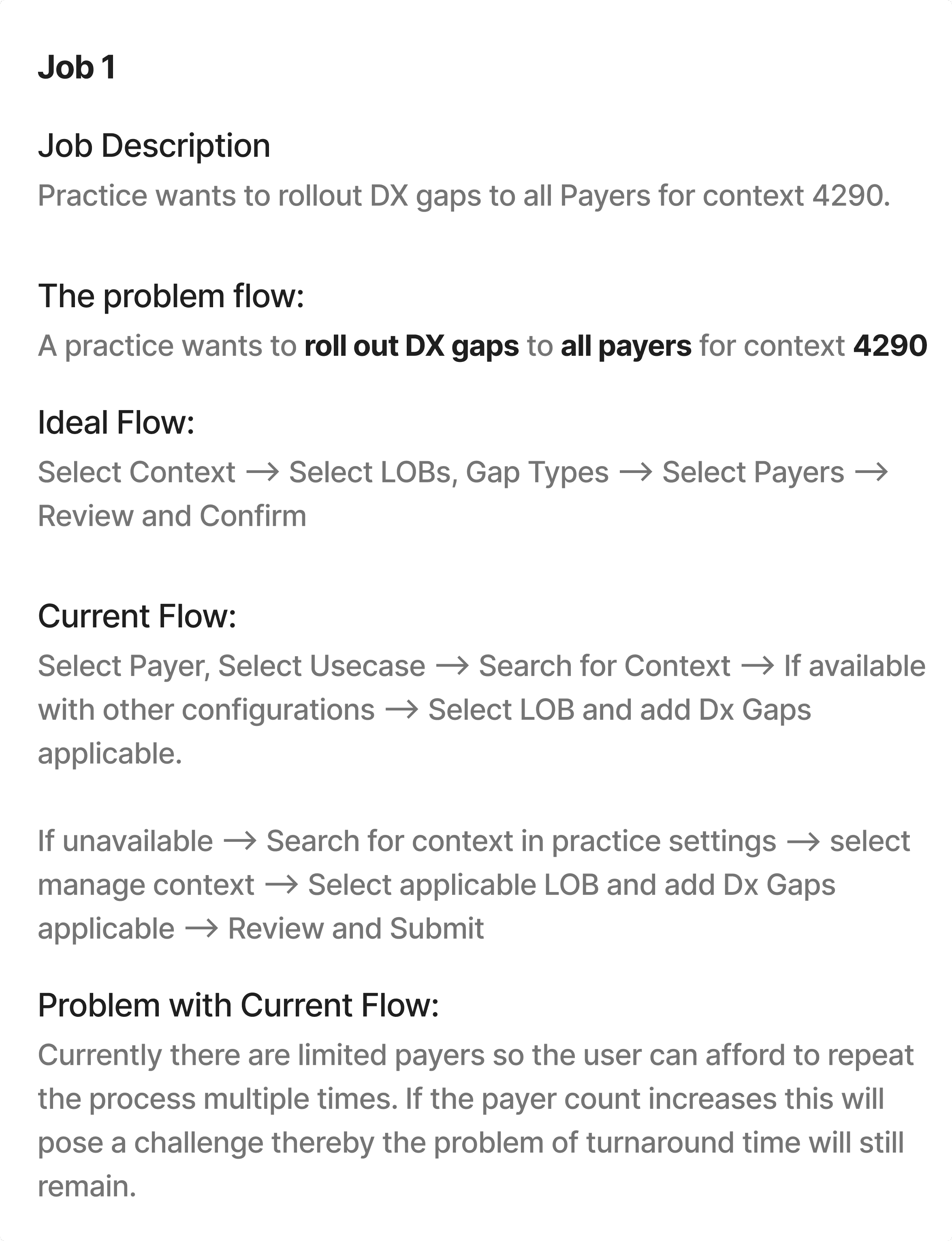
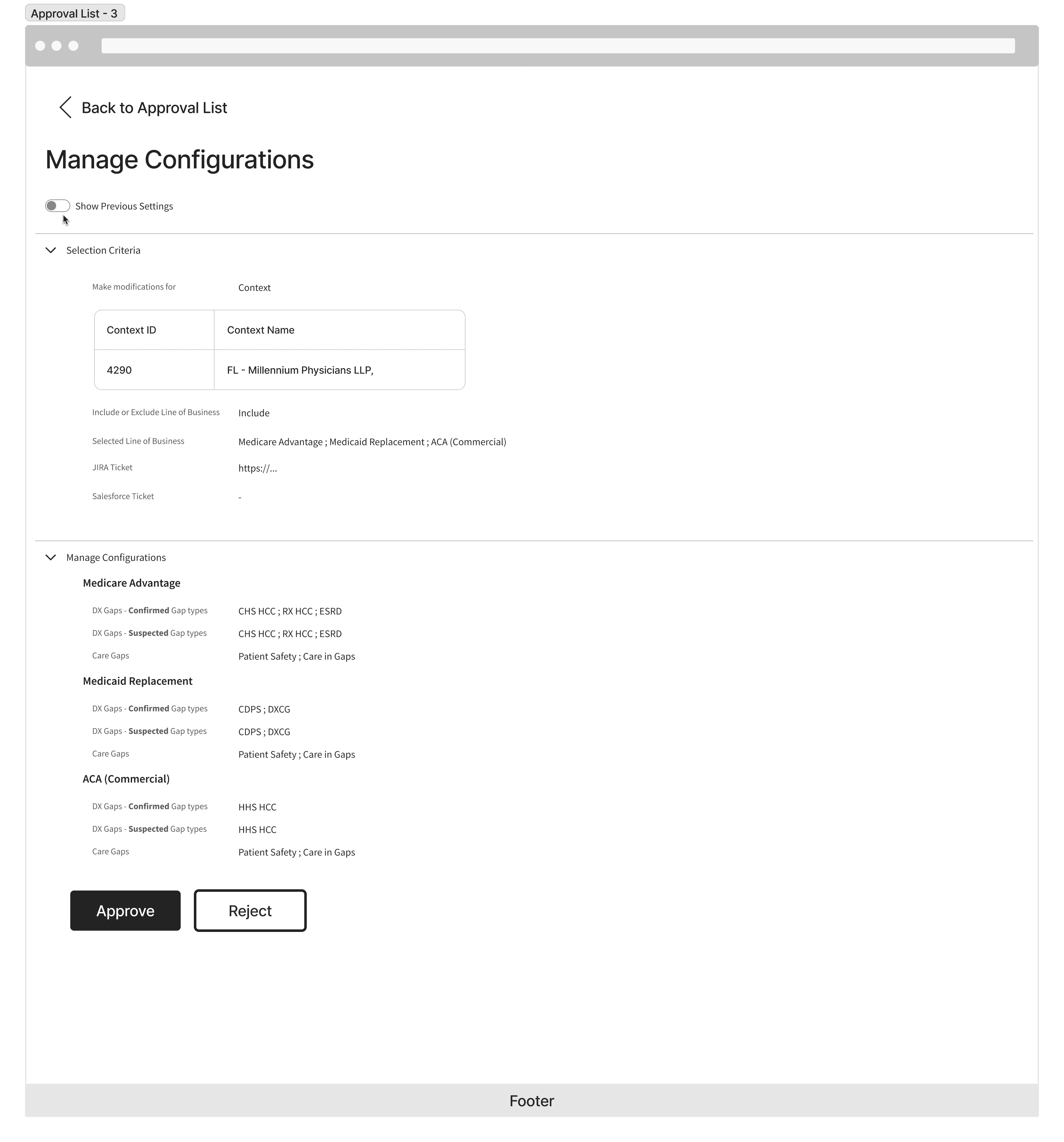
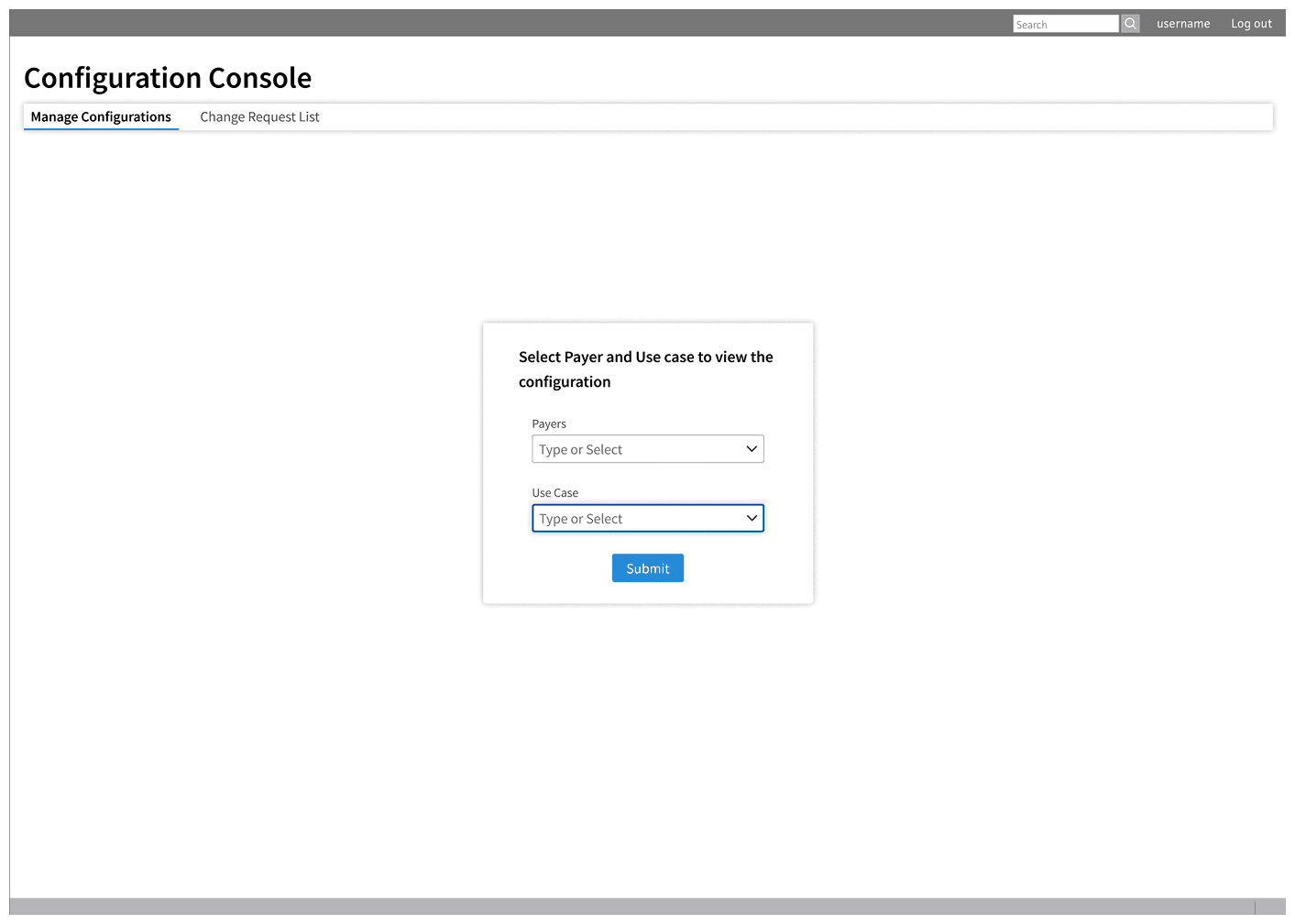
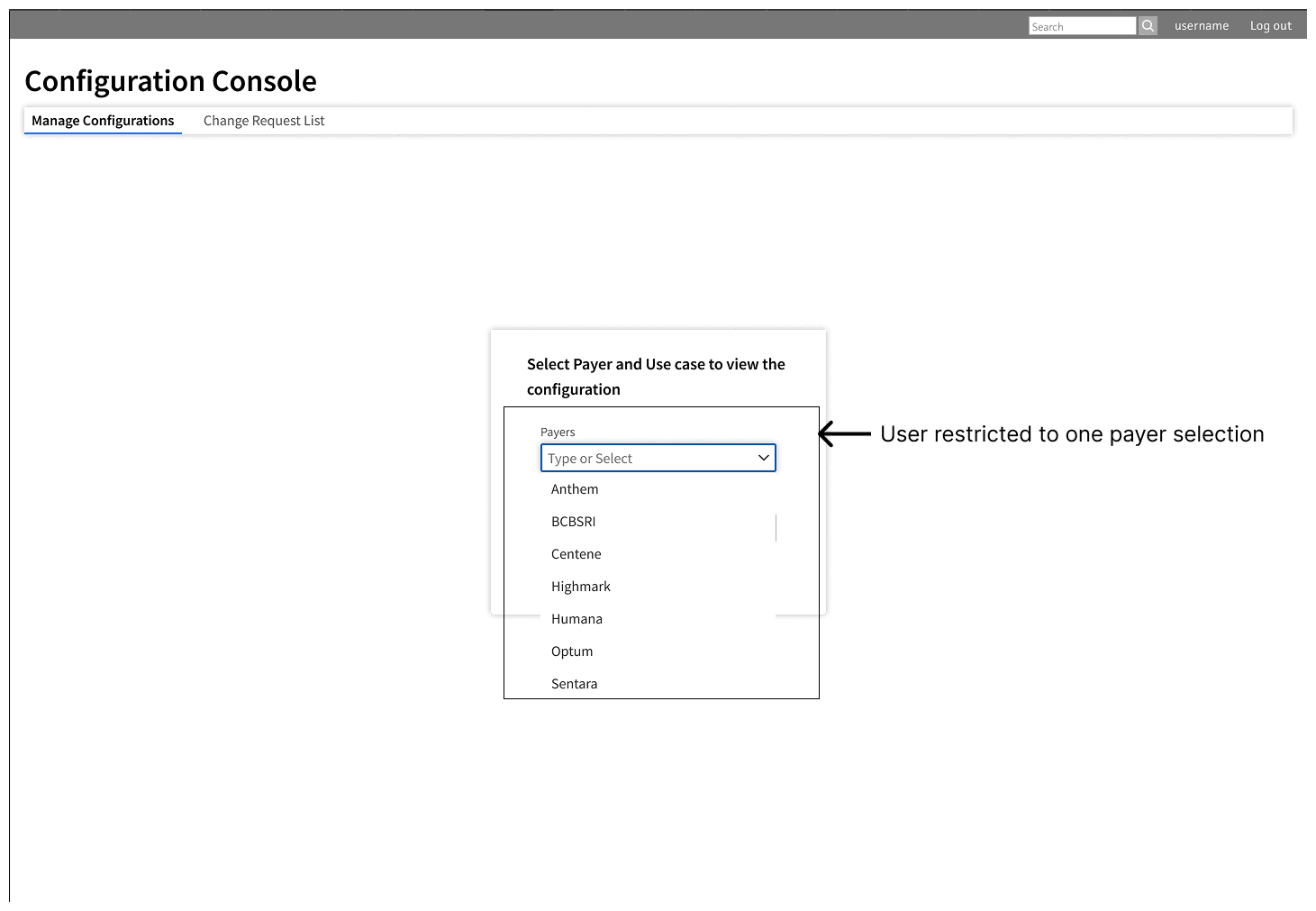
To mitigate high risk of "bulk errors" identified in research, I enforced a Single-Payer configuration guardrail accompanied with deliberate friction points while maintaining the core process to mimic their current workflow.

Reducing Technical Debt

Critically, I chose not to dismantle the Engineering team's functional data model but demanded a backend rewrite. I applied surgical UI edits, transforming their concept into a seamless flow, which saved months of development time.

// 05. Design

The Solution

// The Structure

// The Ideation (Future State)

// Final Designs

// Standardizing Terminology & Mental Models

Fixing the Language to Align with User Goals

Engineering-Centric Taxonomy

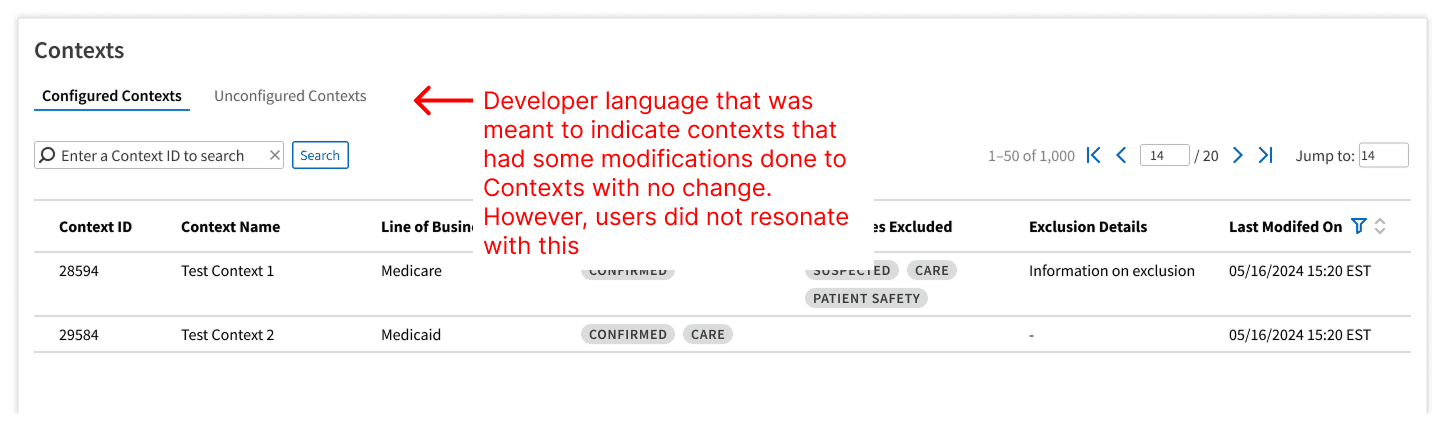
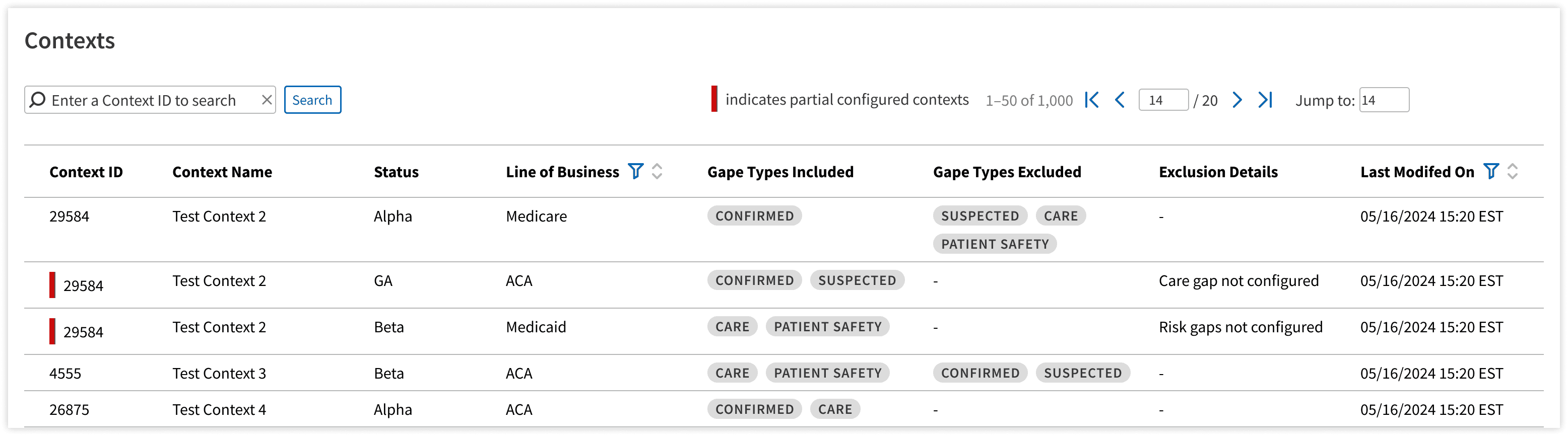
The legacy interface exposed database states ('Unconfigured'). Users interpreted this as 'Broken' or 'Empty,' rather than 'Default,' causing hesitation in the workflow

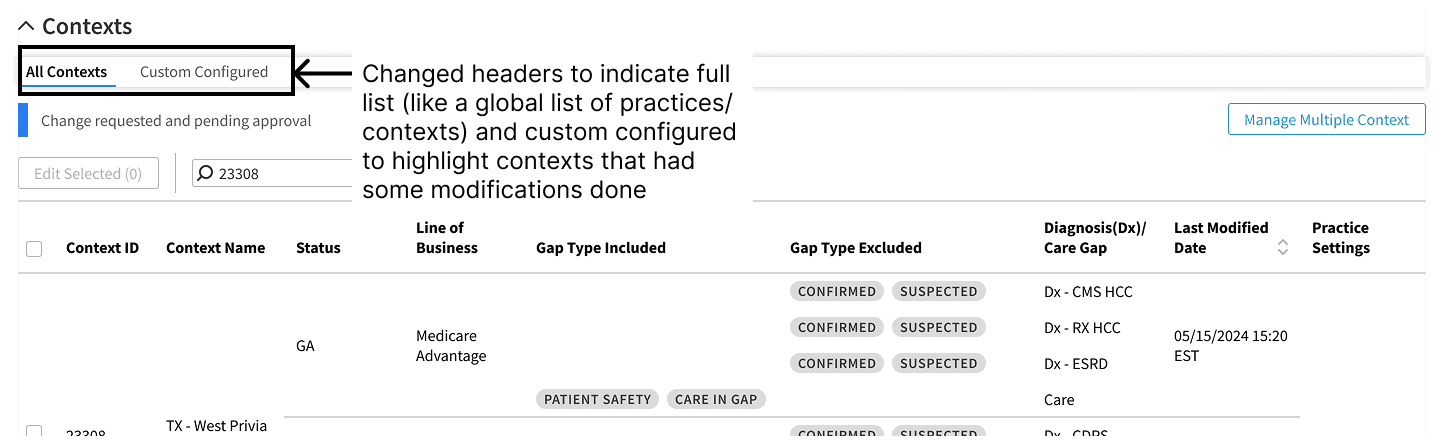
User-Centric Taxonomy

Renamed to 'All Contexts' (Global View) and 'Custom Configured' (Exception View). This terminology aligns with the user's mental model of inheritance—viewing the baseline vs. the specific overrides

// 05. The Outcome and Beyond

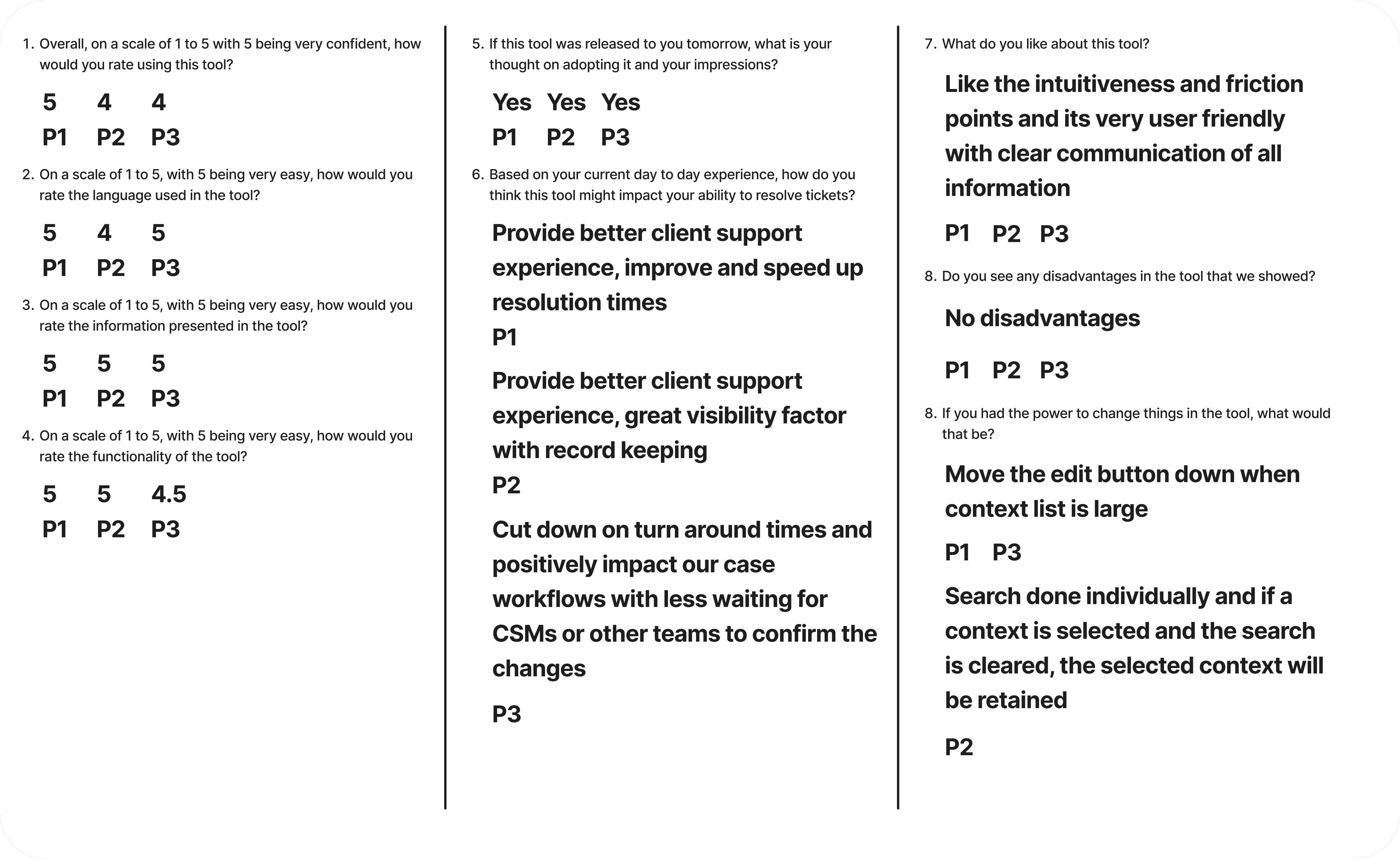
Usability Testing Results

The solution translated validated jobs and dependency maps into a tangible design. I focused on defining the information structure, creating high-fidelity prototypes, and conduting user testing to derisk the investment

Usability Score

Task Success Rate

98.9%

Avg Ease of Use

4.8/5

Training Required

Minimal

Compliance Score

Friction Feedback

Positive

Change Requests

Minimal

Error Prevention Rate

100%

Efficiency Score

Resolution Time

< 14 to 15 mins

Engineering Dependency

Removed

Sample image of UT questions asked and synthesis

// Beyond the Scope

Strategic Ripple Effect

Post launch, the HPDE team initiated discussions to repurpose the existing framework. To ensure a data-driven approach, a research-first expansion was proposed in lieu of immediate development. This involved a comprehensive user study designed to map specific journeys, pain points, and use cases. By prioritizing this discovery phase, the team ensured the tool's positioning aligned with HPDE's unique requirements before committing engineering resources to scale the platform.

The Lasting Legacy

An evaluation of the Design System identified a critical limitation regarding data density. With practices managing complex Line of Business across Alpha, Beta and GA stages, standard tables created overwhelming visual clutter. The solution involved engineering a Grouped Table Pattern specifically to minimize cognitive load.

Although this required a deviation from established guidelines, the design was championed through a formal review process. After demonstrating why nested table alternatives were insufficient, the team granted approval. The pattern has since been integrated into the design system as a "Use Case Pattern Asset", turning a project-specific solution into a global standard.

Defined in Org.

Approved Use Case

Defined in Org.

Defined in Org.

Approved Use Case

Let's build high-trust ecosystems

©️Copyright 2026. Hariharan R

Let's build high-trust ecosystems

©️Copyright 2026. Hariharan R

Let's build high-trust ecosystems

©️Copyright 2026. Hariharan R

Let's build high-trust ecosystems

©️Copyright 2026. Hariharan R